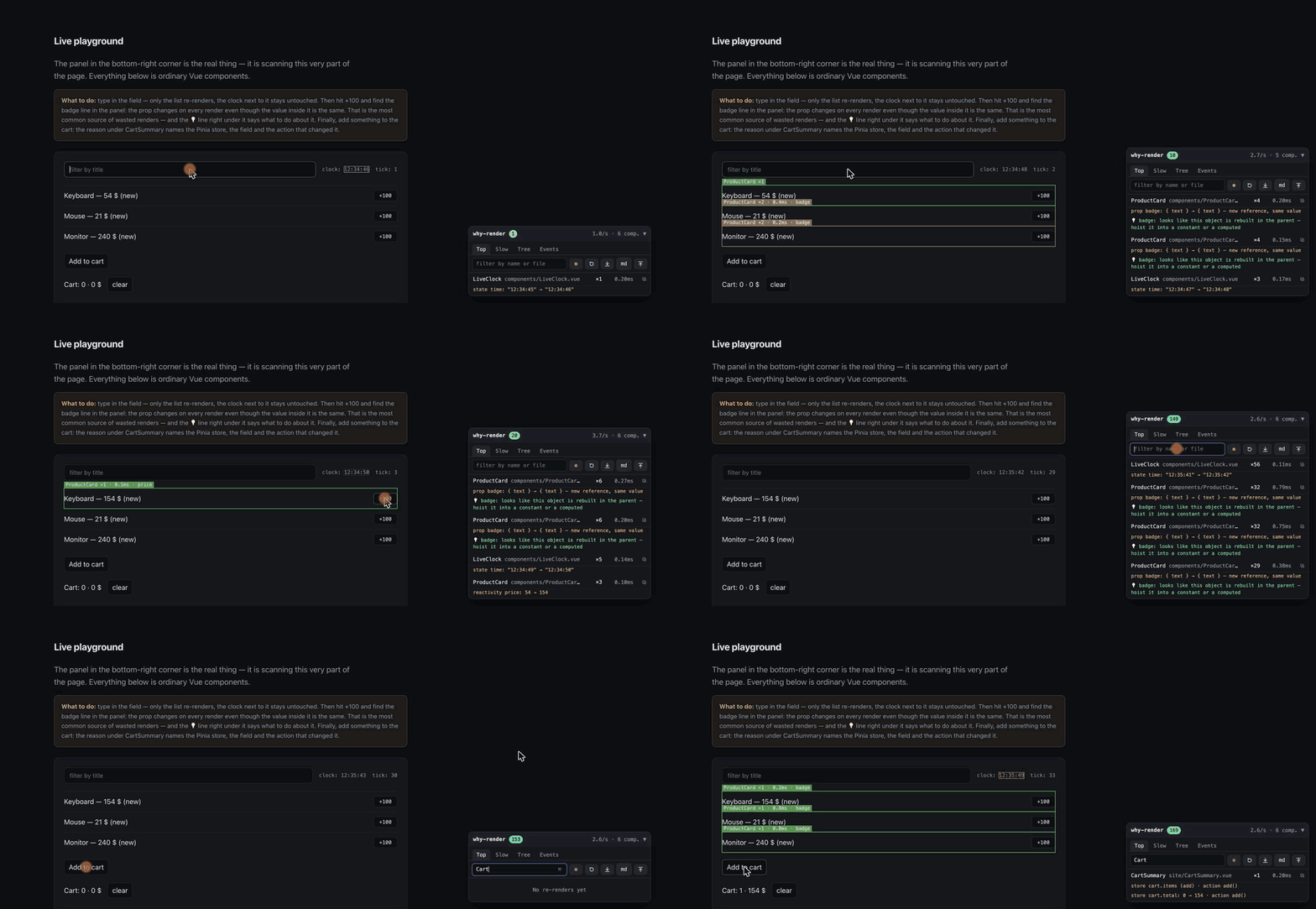
A month ago I wrote an article about building a render debugger for Vue: a tool that tells you the exact reason behind every re-render. I talked about renderTriggered, and about the pitfalls with process.env.NODE_ENV, Cyrillic text in byte offsets, and evaluating other people's computeds.
Since then, version 0.8 has shipped, with three big features I didn't plan to build this soon. Here's what's new and why.
Where it started
If you haven't read the first article, here's the short version. vue-why-render hooks into a Vue 3 app with two lines:
import { scan } from 'vue-why-render'
scan(app, { panel: true })
It then shows, on every re-rendered component, its name, render count, duration and the reason. Not target: Proxy, but prop badge: {text} → {text} — new reference, same value. For Pinia it's store cart.items: Array(1) → Array(0) · action clear(). For the router it's route.params.id: "1" → "2".
On top of that there's a panel with five tabs, render budgets, tests (expectRenders(Card).toBe(0)), and JSON/Markdown reports. Zero dependencies, MIT.
What's new in 0.8
1. Reactivity graph (Deps)
Until now, vue-why-render answered the question "why did this component re-render?". Now it also answers "what depends on what?".
The new Deps tab builds a live dependency map: component ↔ reactive source. This is where I finally hooked into renderTracked. In the first article I explained why I didn't use it (too many calls, it slows the app down). The fix: collect the data lazily, only while the Deps tab is open, and deduplicate on the fly.
There are two modes:
- Components → which refs, props, stores and computeds does this component read?
- Sources → which components depend on this ref?
Every edge shows a count of reads and triggers. If UserAvatar reads user.name 47 times but that caused only 2 renders, the rest of the reads are harmless. If CartBadge jumps on cart.items with every keystroke, that's your problem.
It's an X-ray for Vue reactivity.
2. Rust/WASM core
In the first article everything ran on plain JS. That's fine for small apps. But once you have hundreds or thousands of components, three operations start to get noticeably slow:
- Building the component tree
- Deduplicating render reasons
- Comparing (diffing) two reports
I rewrote them in Rust and compiled them to WebAssembly.
How it works:
The WASM module is loaded lazily, as a separate chunk. Your app bundle doesn't grow: until vue-why-render is actually needed, nothing extra is loaded. If WASM isn't available (SSR, jsdom, a strict CSP), it automatically falls back to JS. There's nothing to configure.
scan(app, { panel: true })
// Under the hood:
// 1. Try to load the .wasm chunk
// 2. If ok, use the Rust implementation
// 3. If not, switch to JS
// The consumer doesn't notice the difference
For a typical app you won't notice the speed difference. For a large one you will.
3. VS Code extension
Browser DevTools are fine, but I got tired of switching between Chrome and VS Code. So I built a WebSocket bridge: the scanner in the browser streams data straight into the editor.
What you get in VS Code:
- Component tree in the sidebar, sorted by render count, with 🔥 icons for hot components
- Dependency tree: the same reactivity graph
- CodeLens on
.vuefiles: render count and average duration right above<script setup> - Status bar: a live render counter
- Commands: pause, resume and reset from the command palette
No more jumping between the browser and the editor. The data is right where you write the code.
What else was added
Vue DevTools integration: besides its own panel, vue-why-render now registers itself in Vue DevTools. You get a second inspector with a tree of reactive sources (color-coded tags: ref, prop, store, computed) and a second timeline layer that logs every trigger as an event.
Nuxt module: one line in your config:
export default defineNuxtConfig({
  modules: ['vue-why-render/nuxt']
})
The module is already listed in the nuxt.com/modules catalog.
Wrapping up
In a month the package got 668 downloads on npm, made it into the Nuxt modules catalog, and picked up three features I honestly wasn't planning to build for the next six months.
npm i vue-why-render- For Nuxt:
modules: ['vue-why-render/nuxt'] - Zero dependencies. MIT. Vue 3.3+.
- Live demo
- GitHub
- The first article
If you find a bug or want a feature, issues are open.